
How I Use AI & Notion to Maximise the Value of Reading
The prompts and Notion setup I use to turn highlights into actual insight.
ARTICLES


I read a lot. I also have a lot of interests and side projects. I need to read loads to learn so I can support all my side projects, and yet, there are not enough hours in a day or years in my life to read everything I want, and then also remember everything and apply the new knowledge where I need to, at the right time.🙂
I started playing around with AI to help me out with this, and found a way that, alongside my Notion reading database, speeds up how I read and apply what I learn. I do, of course, still need to read the books and save the highlights, but what I now automate is this: adding books into the database (so I don't need to do it manually for each book) and filling my Notion pages with book highlights, core frameworks, arguments, quotes, takeaways, and, of course, how to apply everything to my projects.
If you find yourself in a similar boat of the never-ending reading situation, you might find it useful, too.
The Reading List Template
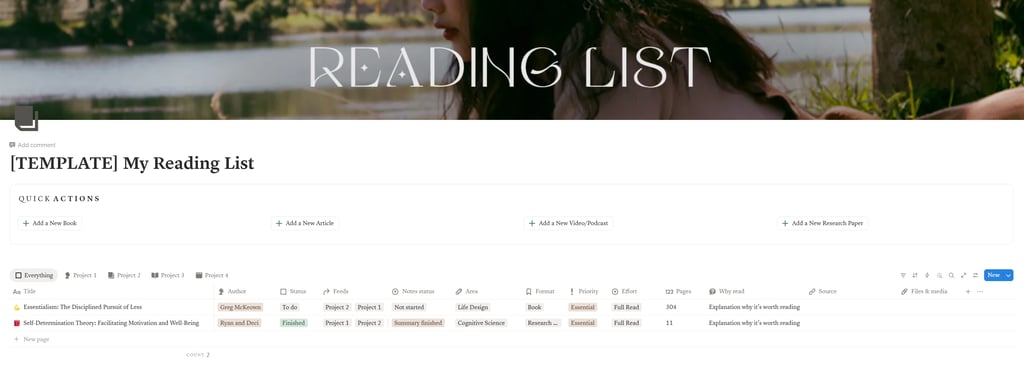
First, click here to download my Notion Reading List template (or just create your own).
It’s pretty self-explanatory once you’re there, so I won’t go into much detail, but here is a summary:
Title: The title of the book/journal/article;
Author: The author of the book/journal/article;
Status: Reading status;
Feeds: Projects that the book/journal/article feeds. Can be multiple.
Notes status: If you’re taking notes, then this is a column that showcases the status of where you are with it.
Area: The genre/topic/area that the book/journal/article is exploring.
Format: Book/journal/article, etc.
Priority: Won’t be important for most, but for me, it shows which content I need to prioritise for certain projects and things I want to do (e.g., I might need to read something to complete a certain project, so it will be of high priority, whereas some material might be purely just for fun, so it can be deprioritised).
Effort: Whether it needs to be fully read, partially read, or simply skimmed. E.g., I might be reading a book to find or understand a very specific thing, which means I can just partially read it rather than spend hours reading the whole thing in full.
Pages: Not important for most, but I add it to know how much time I can expect to spend on it once I pick it up. It lets me prepare mentally before I start.
Why read: I have hundreds of books on my list - some recommended by people I trust, some that I saw recommended on the internet, some that I found myself when researching specific topics. I use this section to explain why I saved it into my reading list and why I need to read it: what sections are important, what questions I should be able to answer after reading, etc. I use AI to help me with this section now, and I'll share with you how later.
Source: a link to the book (e.g., Goodreads or Amazon).
Files & media: I rarely use it, but sometimes I upload research papers there as I highlight them when I read, and I want to have the highlighted file saved there. For most, this will not be relevant and can be removed.
Relation: I removed this from the template because I use the relation columns to connect my reading list with my content calendar and projects that directly benefit from specific reading material. I highly recommend you add this in after downloading, too, if relevant.
Now, within this database, there is also a templated page (set as the default). This means that each time you add a new entry, you'll get a page with the template within it. You can update it as you please. The current template has the following sections, and I will explain which ones you need to fill out and which ones you can outsource to AI.
Page template:
Before reading:
Why I’m reading this book / What I want to learn: I did fill this in myself at the beginning until I asked AI to give it a go, and found it does a much better job than I do. :)
During reading:
Key highlights: I personally highlight the areas I want and paste them in this section. AI can’t know what I’m looking for exactly and what words, paragraphs, or quotes will deeply move me. I also highlight long paragraphs, not just ideas, because I don't want to reread the same books over and over. I just want to extract all information I find important and interesting, so I only need to reread my highlights.
Core arguments, frameworks, quotes, takeaways, and applications to my projects are filled in by AI, using my highlights.
How I Use AI to Speed Up the Process
Before you ask AI to help you with this, first create a database with the list of books/journals/articles you want to have in your list. If you are just starting to get this organised and have tons of things you want to save in the database, then you can speed up the whole process with AI, too. Simply follow these steps (skip this if you're just starting and don't have a list):
Create an Excel sheet (or Google Sheets) with the same columns as in the Notion Reading List.
Collect the books/journals/articles from all your random places and add them to the Excel sheet you created. You'll need to add titles and authors in the first two columns (unless titles are unique and there is no way several books with the same title exist).
Save the sheet as .xls and upload it to your chosen AI (I recommend Claude) with the following prompt (just update the projects section with your projects first):
Act as my reading list organiser who helps me fill in the data I'm missing.
I have uploaded a sheet with my reading list, and I need you to fill in the columns below accurately, based on the information I share about me and my projects:
1. My name: [enter your name]
2. Description of the key projects I’m working on right now:
- Project 1: [explain what it is, what you're working on, what areas you are exploring]
- Project 2: [explain what it is, what you're working on, what areas you are exploring]
- Project 3: [explain what it is, what you're working on, what areas you are exploring]
3. Core questions I’m trying to answer across my work: [write something only if applicable]
4. Theoretical or intellectual threads that run through everything I do: [write something only if applicable]
Columns to fill out in the attached sheet:
- Status: 'To do'.
- Feeds: What project(s) it relates to the most?
- Notes status: 'Not started'.
- Area: Genre or topics being explored, so I can easily filter content based on a specific area I want to read about (e.g., Life Design, Business, Psychology, etc). If there are multiple, please pick one.
- Format: Fill this in, but only if I left it empty
- Priority: Note if this is an 'Essential', 'Urgent', 'Recommended', 'Optional', or 'Just for fun' read based on the content available and application to my projects. Reading just for fun would be material that doesn't directly apply to any of my projects or areas of interest (e.g., fiction books)
- Effort: I know that some books do not need to be read in full to extract the important info. Please provide your recommendation on whether I should do a 'Full read', 'Partial' read, or just a 'Skim'. Make sure you only select one option.
- Pages: If you can find it - include it.
- Why read: Tell me why reading these certain materials is useful for me and how it supports my project(s). If you think it's a waste of time, note this on the sheet in an empty column next to it. If only certain chapters matter, advise which ones.
What success looks like:
You return me a fully filled-in sheet with the missing data that I can download and import to Notion. Do NOT add any new rows or titles that are not present in the original file.
Run the prompt and after a few seconds, you'll receive a filled-out sheet. Download it, open it, and export it as a CSV.
Then, go to the Reading List template database on Notion.
Below the database, somewhere in an empty area, start typing /import and select the “CSV import” option from the page menu.
Click Choose File and select your organised reading list CSV file (e.g., Reading List Organised.csv).
Select Import into existing database if you are using my reading list template (alternatively, you can create a new database simply by uploading this CSV).
Search for and select the database where you want the CSV to be imported (e.g., [TEMPLATE] My Reading List).
Click Map CSV Headers to ensure the data in your file aligns with your Notion columns. Review the mapping for each column. The import preview shows how fields like Feeds, Area, Priority, and Why Read will appear in the reading list template.
Click Import CSV to finalise the process. Once imported, the entries will appear in your database.
Isn’t this absolutely awesome?
Now, you won’t always need to create a full list for the database, so once you have a working database, you can start using things like Make.com to automate the process each time you add a new book/journal/article to the database, so that AI fills all that extra info out for you. I won't go into that here, as I personally use Claude Pro now, and it does it for me automatically. I'll explain how below.
Path 1 - The Free Way:
This is what I personally did before I got Claude Pro, so if you're not ready to pay for your AI assistant yet, you can follow the same/similar process as I did.
Create Project 1: Reading List Helper (or Gem 1 if you’re using Gemini), then update the instructions below, copy, and paste it in the instructions field:
You are my Personal Reading Assistant. I will provide you with a Book/journal/article Title and Author. Your job is to research it and provide data formatted for my Notion Reading List.
My Projects & Context:
Project 1: [explain what it is, what you're working on, what areas you are exploring]
Project 2: [explain what it is, what you're working on, what areas you are exploring]
Project 3: [explain what it is, what you're working on, what areas you are exploring]
Your Output Requirements:
For every book/journal/article I give you, provide a structured list with these exact headers:
Feeds: Which of the projects above does this support?
Area: The specific genre or academic field (e.g., Neuroscience, Systems Theory).
Priority: Categorise as 'Urgent', 'Essential', 'Recommended', 'Optional' or 'Just for fun' (Just for fun is when the book is not directly useful for any project).
Effort: Suggest if I should do a 'Full read', 'Partial', or 'Skim'.
Pages: The approximate page count, if applicable.
Why Read: A 2-3 sentence explanation of exactly how this book helps the project(s) it feeds. If I should focus only on specific chapters, let me know this here.
Once you have this set up, every time you have a new book/journal/article you want to add to the Reading List database, simply send it to AI in the chat first ([Title] by [Author]) to get the extra info so it’s easier and quicker to fill in the details on your database. Eventually, if you use this a lot, you can get an automation set up as mentioned earlier, which would transfer all that info to your Notion directly, without you needing to do it manually.
Now, for Project 2, you'll ask AI to fill in the page templates for each item you add to your database. Call it your Research Assistant and update, copy and paste the below prompt in the instructions field:
Act as an intelligent reading assistant who helps me extract maximum value from the books/journals/articles I read and apply them meaningfully to my work and life.
Information you need:
1. My name: [enter your name]
2. Description of key projects I’m working on right now:
Project 1: [explain what it is, what you're working on, what areas you are exploring]
Project 2: [explain what it is, what you're working on, what areas you are exploring]
Project 3: [explain what it is, what you're working on, what areas you are exploring]
3. Core questions I’m trying to answer across my work: [write something only if applicable]
4. Theoretical or intellectual threads that run through everything I do: [write something only if applicable]
HOW THIS WORKS
PHASE 1 - BEFORE I READ
When I give you a Title and an Author, write me a short orientation:
Why I'm likely reading this, based on what you know about my projects
What questions I should hold while reading
Any important context about the author, framework, or field
PHASE 2 - AFTER I READ
When I send you: '[Title] by [Author] completed. My highlights: [pasted highlights]'
Produce a five-section synthesis:
1. Core arguments — What is the author fundamentally claiming?
2. Core frameworks — What models, structures, or tools do my highlights introduce?
3. Meaningful quotes — Specific lines worth reusing or referencing (verbatim from my highlights)
4. Key takeaways — What should change in how I think or act after reading this?
5. Application to my projects — Concrete ways to apply this to each of my specific contexts
IMPORTANT RULES
Do not hallucinate. If my highlights are too thin to draw conclusions, say so.
Flag contradictions. If you know of stronger or conflicting sources, point me to them.
Note gaps. If something important seems missing from my highlights, name it.
Be critical. Present frameworks with their limitations, not just their strengths.
Never skip a section. All five must appear in every post-reading output.
You'll receive everything in the chat, and then you can manually move them to your relevant Notion page.
Path 2 - The Paid Way:
Now this is what's cool when you get a paid version - you can connect your Notion workspaces to Claude using MCP and have it do everything on your behalf. All you need to do here is to just read the books and take highlights, and let AI do all the admin for you.
If you're on Claude Pro, you can just skip the two separate helpers I explained above, skip the copy-pasting, skip Make.com, skip all of it. Instead, you create one custom skill that connects Claude directly to your Notion database. It works in every conversation - you don't need to open a specific project or remember which chat to use. You just... talk to Claude, anywhere, and your reading list updates itself.
Here's what that looks like now. I open any Claude conversation and type (or speak):
"Add [Book Title] by [Author] to my reading list database."
Claude then does all of this without me touching Notion:
• Checks my Notion database to make sure the book isn't already there
• Researches the book online to get context about the author, the field, and the page count
• Creates a new entry in my Reading List database with every property filled in - Title, Author, Format, Genre, which of my projects it feeds, Priority, Effort, Pages, and a "Why Read" explanation tailored to what I'm actually working on
• Writes a pre-reading orientation directly inside the Notion page template: why I'm likely reading this, what questions to hold while reading, and any useful info about the author.
When I finish the book, I paste my highlights into the chat and say something similar to "finished" or "highlights complete," and Claude generates a full synthesis - core arguments, key quotes, takeaways, how to apply them to my specific projects, content ideas the reading sparked, and flags anything important my highlights might have missed. Then it updates the Notion page with everything and flips the status to "Finished."
No Make.com. No Zapier. No CSV exports. No switching between tabs. I talk to Claude like I'm texting a friend, and my reading database fills itself. That said, you can probably just give a list of books you have to Claude and ask it to create you a complete database directly in your Notion - which means you can skip the very first step I've written above, too. I haven't tested it myself, as I prepared this before this was a thing, but I don't see why it couldn't be done.
So here's how to set up this skill:
What you need before you start:
Claude Pro subscription
Notion connected to Claude (go to Claude settings, find "Connected Apps" or "Integrations," and add Notion)
Your Reading List database already set up in Notion with the properties and page template described earlier in this article
Step 1: Connect Notion to Claude
Go to your Claude settings, find "Connected Apps" or "Integrations," and add Notion. Claude will ask for permission to access your workspace. Grant it. That's your entire technical setup - Claude can now see your databases, find your templates, and create pages directly. Amazing, isn't it?
Step 2. Update, copy, and paste the skill below into any Claude chat
Build a skill that automates my reading workflow by creating entries in my Notion Reading List database and populating them with pre-reading orientations and post-reading syntheses.
Skill Title: Reading Companion Skill
My name: [YOUR NAME]
Key projects I'm working on:
- Project 1: [explain what it is, what you're working on, what areas you are exploring]
- Project 2: [explain what it is, what you're working on, what areas you are exploring]
- Project 3: [explain what it is, what you're working on, what areas you are exploring]
3. Core questions I'm trying to answer across my work: [your questions]
4. Intellectual threads that run through everything I do: [your threads]
Database Properties
When creating a new entry in my Reading List database ([include the URL link]) in Notion, fill in the following properties:
Title - the book title
Author - the author of the book
Format - one of: Book, Article, Research Paper, etc [select the correct one from the existing list]
Area - the relevant genres from the database's existing options
Feeds - which of my projects above this feeds [select the correct one from the existing list]
Status - set to "To read"
Notes status - set to "Not started"
Priority - one of: Urgent, Essential, Recommended, Optional, Just for fun
Why read - a brief explanation of why this is useful for my projects
Pages - page count if you can find it
Source - a link to the book (e.g. Goodreads or Amazon)
Effort - one of: Partial read, Skim, Full Read
Workflow
PHASE 1: Adding a New Book (Pre-Reading)
When I mention a book title (and optionally author):
1. Search my Notion workspace for my Reading List database (or go straight to the URL link I provided above). Check if the book already exists. If it does, update it if needed instead of creating a duplicate.
2. Research the book using web search to confirm the author, get context, find the page count, and understand the book's arguments.
3. Create a new page in the Reading List database using the default template, with all properties filled in.
4. Then populate the pre-reading orientation inside the page:
Why I'm reading this book / what I want to learn. Including:
What questions to hold while reading
Important context about the author or field
5. Show me the orientation in chat and confirm the page was created with a link.
PHASE 2: Post-Reading Synthesis
When I send highlights (pasted text, uploaded file, or say I've finished a book and you can find highlights inside the existing page on Notion):
1. Process the highlights by reading them first.
2. Generate the synthesis with these sections:
- Core Arguments - What is the author fundamentally claiming?
- Core Frameworks - What models or tools does the text introduce?
- Meaningful Quotes - Lines worth reusing (verbatim from my highlights)
- Key Takeaways - What should change in how I think or act?
- Application to My Projects - Concrete ways to apply this to each project
- Important Things I May Have Missed - What the highlights didn't capture but the book likely covered
3. Find the existing book page in my Reading List database and update it with the full synthesis.
4. Update the status to "Finished" and the notes status to "Summary finished".
5. Confirm the page was updated and give me a link.
Critical Rules
- Never hallucinate. If highlights are too thin to draw conclusions, say so.
- Flag contradictions. Point to conflicting sources when known.
- Note gaps. Name what seems missing from my highlights.
- Be critical. Present ideas with their limitations, not just their strengths.
- Never skip a section. All sections must appear in every synthesis.
Claude will create a skill - review, in case you want something updated.
Once happy, click the "save skill" button, and it will be saved to your Claude account and ready to use.
Step 3: Test it
Open any conversation in Claude and type something like:
"Add Atomic Habits by James Clear to my reading list."
Claude should research the book, create a new entry in your Notion database with all properties filled in, write a pre-reading orientation inside the page, and give you a link. If it works - you're done. Your reading list now fills itself.
Then test it in a new chat typing "Atomic Habits complete. Highlights" and paste the highlights. Claude should update the rest of the page for yoy, using the highlights (you can just paste any random summary at this point"
Which Path Should You Pick?
If you're on free AI usage and not ready to upgrade, then path 1 is great. It's how I ran my reading list for months, and it cut my admin time noticeably. AI gives you info, and you just save it in the correct sections. But if you're on Claude Pro and you want the whole process to be automated, then Path 2 removes the pasting entirely. One skill, any conversation, zero tab-switching. You connect Notion once, create the skill once, and from that point on, your database just updates when you talk about books.
Either way, the point is the same: your reading list should be something that works for you, not a graveyard of half-remembered recommendations collecting digital dust. It'll be most useful if you're very detailed with the projects and topics you’re interested in. If you’re vague, then the output might not be as useful as it could be, so do spend a minute or two to update these prompts with your details.
Thanks for reading!
Lina


© Copyright LINA MILESKAITE 2026
Get in touch